Privacy and data collection
The Privacy tab (/?tab=privacy) surfaces the TV's telemetry, advertising, and content-recognition settings in one place — most of which are buried across multiple submenus in LG's interface.
-
One-click privacy summary
Opens with an at-a-glance status of screen recognition, ad tracking, and usage reporting, plus a single button to switch all of them off while leaving voice recognition untouched.
-
Screen recognition (ACR) & services
Reports whether LG's content-recognition engine is running and sampling frames, shows the physical microphone switch state (on models that have one, such as the C5), and provides switches for LG's background diagnostics uploaders. See What LG's ACR does.
-
Data agreements
Lists every data collection agreement recorded on the TV, grouped by subject, with switches to withdraw consent (persisting across reboots). Accepting new terms is left to LG's own menus.
-
Advertising ID & cookies
Displays the TV's advertising identifier, the Limit ad tracking toggle, and actions to reset the ID and clear stored ad cookies.
-
On-screen ads & promotions
Individual switches for screen saver ads, Home screen sponsored tiles and recommendations, promotions shown while watching, and Smart Tips (each shown on TVs that support it).
-
Log uploads to LG
Switches for whether the TV may send its debug logs and fault reports to LG, which LG's own menus don't have. Some TVs, such as a C5 on webOS 11.2, switch debug log upload back on at each start; an off chosen here is put back within a minute, and switching it on again leaves it to LG.
-
On-TV ad & telemetry blocker
Blackholes LG's tracking, ad, and Alphonso ACR endpoints directly on the TV by bind-mounting a blocklist over
/etc/hostson boot.
On-TV ad & telemetry blocker
Three tier cards (Off, Ads & telemetry, Everything) show what each level allows or blocks at a glance. The built-in blocker runs directly on the TV without needing an external DNS sinkhole (such as Pi-hole), and automatically re-applies on boot.
Apps already running, and those started before the clock synced, get the current list in their sandboxes too, and lose it again when blocking is switched off. It covers lookups through the hosts file; an app that asks a DNS server directly is not blocked.
Blocks LG's advertising, diagnostics, remote-diagnostics, customer-data and Alphonso screen-recognition servers, and the host LG's ad log script reports to, while leaving LG's core service platform reachable (so the Content Store, app updates, and LG ThinQ continue to work). On webOS 11 the diagnostics report upload shares its host with the Content Store, so it stays reachable on this tier; the Everything tier takes it.
It includes LG's regional ad, video-ad and beacon hosts, and Alphonso's and LG Ads' endpoints.
Adds the hosts that carry LG's platform services and Google push messaging:
- What stops working: The LG ThinQ phone app, the Content Store, firmware updates, LG Channels, Alexa, and LG's search, so Glasshouse Home's search is hidden while it blocks it. (To block only firmware updates while keeping platform services, use Block TV software updates on the System tab instead.)
- Google push messaging: Blocks
mtalk.google.comanddevice-provisioning.googleapis.com, endpoints listed by Google for Firebase Cloud Messaging. Apps using them may lose push notifications. They stay reachable on Ads & telemetry. - Content Store: Blocks its interface at
app.lgwebostv.comand recommendations atlgrecommends.lgappstv.com, including the TV's country variants such asde.app.lgwebostv.com. These stay reachable on Ads & telemetry; blocking them prevents the store from opening. - Home and ThinQ: Also blocks Home's recommendation and configuration services, additional ThinQ IoT, push and OCP hosts, and their documented regional names. Home recommendations, device pairing and smart-home features may stop working.
- LG Channels: Includes its LG, Pluto and Xumo dependencies. Blocking these may also affect related Pluto features on the TV.
- Regional LG services: Covers LG's known regions and the TV's country for the
nextlgsdp.com,ibs.nextlgsdp.com,ibsstat.nextlgsdp.com,lgeapi.comand ThinQ IoT service families, plus ThinQ Connect's regional names. This includesde.ibs.nextlgsdp.com,de.lgeapi.com,eic.lgtviot.comandeic-connect-client.lgthinq.com. Blocking these may affect account sign-in, ThinQ, push notifications and store services. The list matches exact names, not every subdomain of these domains. - WiseLG: LG's platform on webOS 11 is
tv.wiselg.com, which also carries the diagnostics report upload and app usage statistics. This tier blocks the bare host, regional names such asaic.tv.wiselg.comandeic.tv.wiselg.com, and the TV's country such asde.tv.wiselg.com. It also coversngfts.tv.wiselg.com,eic-gfts.tv.wiselg.comand the firmware-listeddev-ruc-ngfts.tv.wiselg.com. All wait for clock sync. Some of these names are also reported on webOS 10.3.1. - Additional service hosts: Includes the reported
www.ueiwsp.com,eic-ocp.lgtviot.com,eic-ngfts.lge.comandeic-gfts.tv.wiselg.comaliases. The last waits for clock sync like the othertv.wiselg.comnames. - AirPlay: pairing keeps working. Once the clock is set, this tier blocks the server AirPlay checks the TV's MFi key with after each power-on, and the iPhone then gave up with "Unable to Connect". While it is blocked, Glasshouse has the TV skip that check; the key is still read from the TV itself.
- Clock sync after a power cut: After a cold boot, the blocker waits for the TV to set its clock from LG's time servers before blocking them, including Germany's
de.nextlgsdp.com. If the TV's date is still wrong and apps fail with certificate errors, set the time manually under Settings › General › System › Time & Date (with Set Automatically off). - Additional time-server variants: Known macro-region SDP names,
ruc.tv.wiselg.comand documented country variants such asus7.nextlgsdp.comalso wait for clock sync. Country variants follow the saved TV country; undocumented names such asde7.nextlgsdp.comare not generated. - Switching back: After switching away from everything, LG's built-in apps (such as Content Store or LG Channels) may take about a minute to reconnect while their browser engine's DNS cache expires.
Google hosts that other services share, such as www.googleapis.com and www.gstatic.com, stay reachable; a custom list can add them. Scans of the local network have their own Network device scans switch.
Under Custom ad blocking at the bottom of the Privacy tab, a custom hosts file or plain domain list can be uploaded from the browser:
- Supported format: Standard hosts lines (
0.0.0.0,127.0.0.1,::, or::1followed by a hostname) or one bare domain per line (up to 10,000 domains and 1 MB; lines redirecting to other IPs are skipped). - Combine or replace: Choose Your file and Glasshouse's list to merge the custom list with the active tier, or Only your file to block strictly the uploaded domains.
- Quick troubleshooting: Toggle Block its names off to test whether a custom domain is breaking an app without deleting the uploaded file.
Full tab view
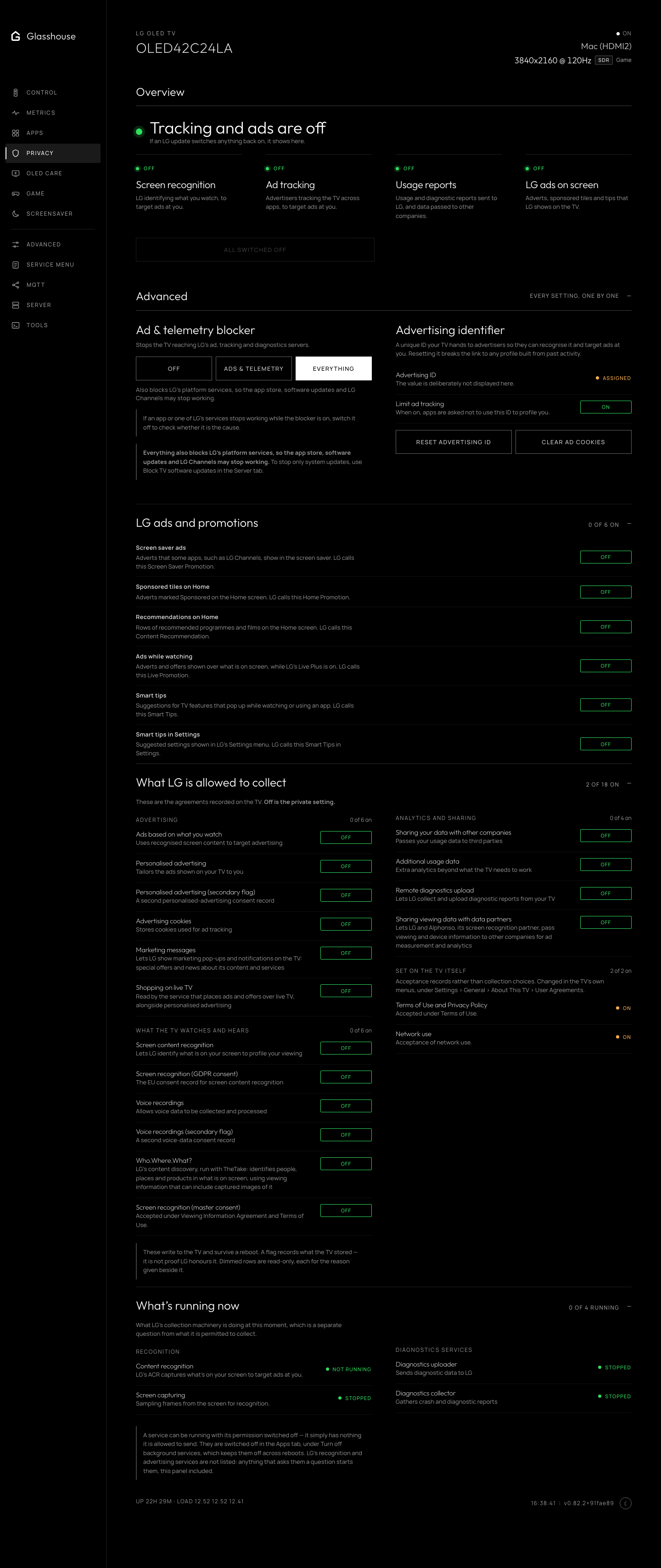
Privacy controls, data agreements, advertising ID, LG telemetry blocking and custom ad blocking.