Pane for iPhone and iPad
Pane for Glasshouse is an iOS and iPadOS companion remote for an LG webOS TV running Glasshouse. It brings the full remote to the couch, alongside source selection, Picture, Audio, Game and HDMI settings, and live telemetry without having to open the web dashboard in a browser. For the macOS menu-bar remote, see Pane for macOS.
Warning
Independent community project: Pane is an independent project by Denis Vinciguerra and is not affiliated with or maintained by the Glasshouse project. Support, bug reports, and feedback should be directed to the Pane repository issue tracker.
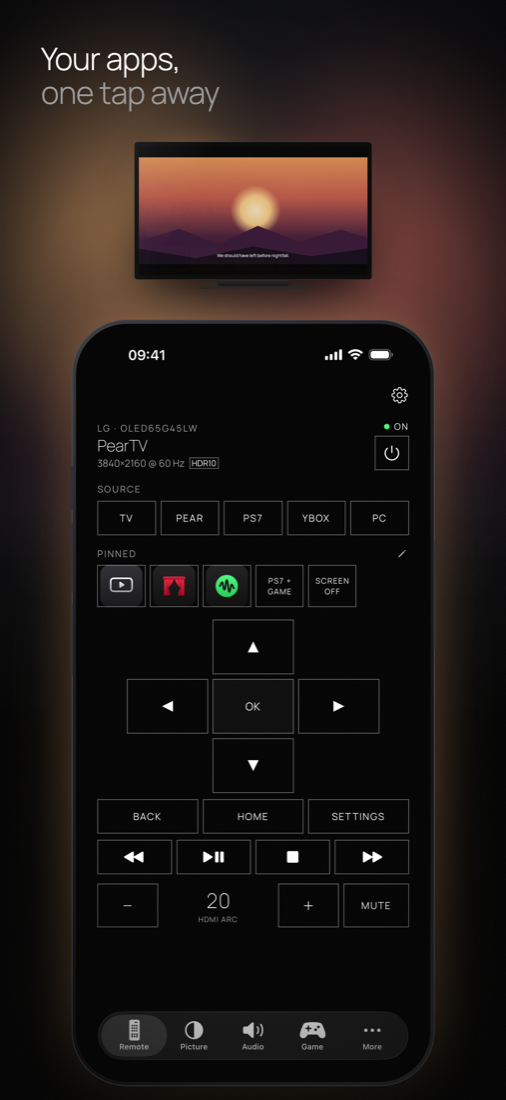
Pane on an iPhone: directional pad, volume, media playback, sources, and pinned app shortcuts on a single screen.
How to get the app
Pane for Glasshouse is available on the App Store for free. The app requires no user account, collects no telemetry, and updates directly through the App Store.
The app requires iOS 17 or iPadOS 17 or later.
Adding a TV
On first launch, Pane presents a welcome screen and searches the local network for Glasshouse TVs across the device's subnet on port 8080.
A TV can also be added manually:
- By IP address: Enter the TV's IP address (such as
192.168.1.20; port8080by default). - By dashboard URL: Paste a dashboard link copied from a browser; its
k=parameter imports the authentication token automatically.
Saved tokens are stored securely in the iOS Keychain and are never sent to an unverified address. There is no cloud sync or account requirement; each device is configured independently.
A Try without a TV option on the welcome screen and in Settings runs the app against a demo TV to try the interface without a physical TV.
Features
- Full remote on one screen: Control power, volume, directional navigation, media transport, and input switching directly from the main view.
- iPad landscape layout: Features a two-column design on iPad in landscape orientation, with the remote on the right by default (swappable to the left under Settings). Portrait orientation, Split View, and Slide Over use the single-column iPhone layout.
- Dynamic settings: Adjust Picture, Audio, and Game settings directly within the app. Settings are drawn dynamically from what the TV server reports, with inline descriptions explaining each setting.
- Pinned shortcuts: Pin frequently used apps, settings, or multi-action sequences to the Remote view, complete with app icons and drag-and-drop reordering. Triggering a pin while the TV is off powers it on first.
- Hardware keyboard support: On iPad with an attached hardware keyboard, Arrow, Gaming, and Custom key profiles navigate the TV while Pane is in the foreground.
- Multiple TVs: Switch between configured TVs with status chips displaying each set's active state.
- Appearance and privacy: Follows iOS system light and dark mode, with English and French language support. No tracking, accounts, or background processes.
Network and power notes
- Network discovery: Until Apple grants a multicast networking entitlement, Pane discovers TVs by scanning the local subnet on the Glasshouse port rather than using SSDP.
- Power control: Pane can turn on a TV over the network from Active Standby (Quick Start+) or LG's Always Ready mode. Waking a TV from deep standby over Wake-on-LAN is not currently supported on iOS.
- IP address changes: Because iOS restricts access to the system ARP table, if a TV configured with an authentication token changes IP address, it must be searched again or updated manually before the token is sent to the new host.
Project links
- App Store: https://apps.apple.com/app/id6830095172
- Source code: https://github.com/denisvinciguerra/pane-for-glasshouse
- Issue tracker: https://github.com/denisvinciguerra/pane-for-glasshouse/issues