Writing a launcher
How to make a home screen of your own and use it in Glasshouse Home's place, without changing Glasshouse. Setting one up is on the Home tab; this page is for writing one.
A launcher is a web page. Glasshouse puts it where LG's Home was, so the Home button, Back out of an app and waking on Home all open it, and it handles the rest: the ways back to LG's Home, a launcher that stops answering, and each webOS version's quirks. The launcher only has to draw itself and say what to open.
Start from the example
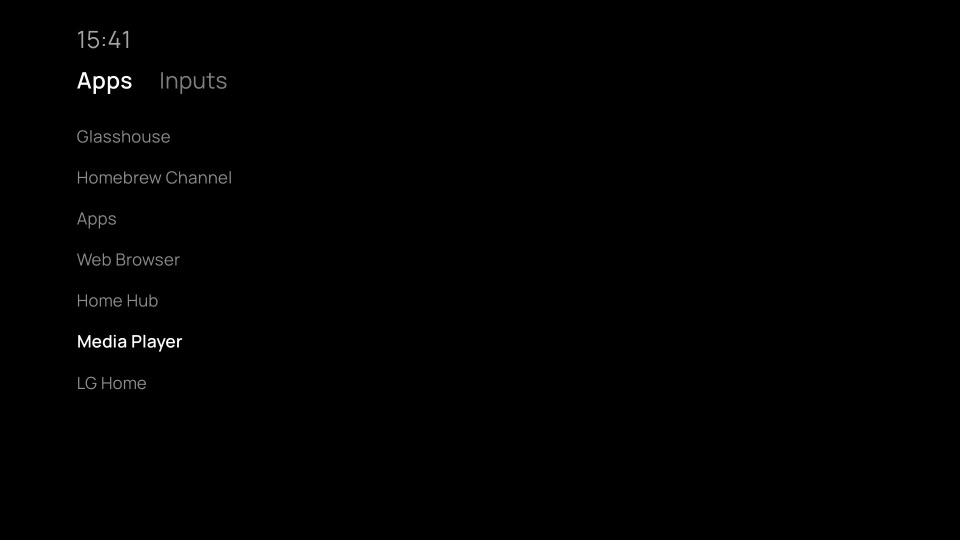
example-launcher.html is a whole launcher in one file:
the TV's apps and inputs as tiles, moved through with the arrow keys and opened
with OK. Download it, upload it on the Home tab under Custom, and
change it from there. Glasshouse Minimal, the plainest home screen that comes
with Glasshouse, is another, as a launcher in one file:
server/assets/home-minimal.html.
What can be uploaded
- A single
.htmlfile, with its script and styles inline. - A
.zipof the launcher's folder. Its start page isindex.html, or themainanappinfo.jsonbeside it names, as a webOS app's does. A zip of the folder itself (everything inside one top folder) is read the same as a zip of its contents. Links in the zip are left out, and it must use standard (Deflate) compression or none. - An
.ipk, a webOS app package asares-packagemakes one. Its web app is used; services and native apps in it are not.
Up to 50 MB uploaded, and 100 MB or 5,000 files unpacked. The launcher's title
on the dashboard is appinfo.json's title, or else the start page's
<title>.
How it runs
The files are served by Glasshouse on the TV, from
http://localhost:<port>/home/launcher/, so relative paths between them work
as they do on any site. The start page is opened in the app that holds LG's
Home's place: under LG's Home's own id on webOS 5 and later, and as the app
com.tvweb.home on webOS 3 and 4.
Glasshouse adds one script to the start page, first in its <head>:
/assets/home-kit.js. It sends the heartbeat that tells Glasshouse the
launcher is up, and gives the page window.Glasshouse, below. Nothing else on
the page is changed.
Stay on the start page. The heartbeat goes with it: a launcher that
navigates away to another page or site stops answering, and about 10 seconds
later Glasshouse gives LG's Home its place back (on webOS 3 and 4 it
opens the launcher again from its start page first). Show other content in an
<iframe>, or open it as an app.
Write for the oldest browser it should run on. The page runs in the TV's
own browser engine: Chromium 38 on webOS 3 and 4 (53 from webOS 4.10), 68 on
webOS 5, and newer after that
(LG's list).
For webOS 3 and 4 that means ES5 (no let, arrow functions or
template literals) and CSS without gap in flexbox, grid or custom
properties. Glasshouse's own pages for the TV are written that way.
Every TV Glasshouse Home runs on
A launcher that should run everywhere Glasshouse Home does, from webOS 3 to
11, keeps to Chromium 38: the syntax above, no calls such as fetch,
Object.assign, String.includes, Element.closest, Map or Set, and no
CSS such as grid, gap, custom properties, min(), max() or clamp().
scripts/check-es5.py in Glasshouse's repository checks for these in a page
named index.html:
python3 scripts/check-es5.py path/to/index.html
It reads code, not what the code does, so some things only a TV shows:
- Newer calls the check does not know, such as
NodeList.forEachorElement.append(Chromium 51 and 54). Loop over aNodeListby index, and useappendChild. - The screen: lay it out in
vhandvw, or percentages, so that it fills the TV's screen as Glasshouse Home does, on a 4K panel or not. - The remote: every TV has the arrow keys, OK and Back; not every TV has a Magic Remote's pointer, so nothing should need it.
- Memory: a webOS 4 TV has far less than a newer one to share among the apps, and the launcher stays open behind every app.
Try it on the oldest TV you have.
Keys arrive as keydown events: the arrows are 37 to 40, OK is 13, Back is
461, and the red, green, yellow and blue buttons are 403 to 406. Back has no
page history to go back to, so a launcher can use it as it likes. Home is
Glasshouse's: a short press opens the launcher, and holding it opens LG's
Home.
Memory is tight, as on any TV. Launchers stay open behind every app, so
large images, video and timers that keep running cost every app the TV opens.
Glasshouse.onCovered says when to stop.
window.Glasshouse
Each call takes a callback in Node's style, function (err, result). These
calls stay as they are across Glasshouse releases; the server's own routes
behind them may change.
Glasshouse.catalogue(cb)
: The TV's apps and inputs, in the order the owner arranged them on the
Home tab, which applies to a custom launcher as it does to Glasshouse Home.
result.apps is a list of { id, title, icon, hidden, folder }: icon is
a URL for an <img>, or null; hidden is true for apps the owner hid,
such as LG's promotions, which a launcher should leave out; and folder
is true for apps put in More apps, which a launcher can show apart or
after the rest. A web page saved to the Home screen is an app here too,
with an id starting page:, and opens in the TV's browser.
result.inputs is a list of
{ id, title, port, tuner, unused, hidden }: each HDMI port, or each
device behind it that the TV knows by HDMI-CEC, with tuner true for the
TV's own tuner, unused true for a port with nothing plugged in, and
hidden true for one the owner hid, or an unused one where they chose to
leave those out.
Glasshouse.channels(cb)
: The tuner's channels, as { id, number, title, radio }, in the TV's order.
Empty on a TV without a tuner or with no channels tuned.
Glasshouse.open(kind, id, cb)
: Opens an app, input or channel: kind is 'app', 'input' or
'channel', and id one from catalogue() or channels(). Only those
can be opened. An input opened by its device's tile selects that device
through HDMI-CEC, as LG's own input picker does.
Glasshouse.lgHome(cb)
: Opens LG's Home, until something else is opened or Home is pressed again.
Glasshouse.iconUrl(appId)
: The URL of an app's icon.
Glasshouse.onCovered(fn)
: Calls fn(true) when an app, an input or the screen saver comes over the
launcher, and fn(false) when it is back on screen. Pause animations and
timers while covered.
Glasshouse.isCovered()
: Whether it is covered now.
Glasshouse.onHome(fn)
: Calls fn() when Home is pressed while the launcher is on screen, and
when it is opened again from an app: the time to close a menu or panel and
go back to the launcher's first screen.
Glasshouse.onChanged(fn)
: Calls fn() when what catalogue() or channels() answer may have
changed: an app installed or removed, a device behind an input naming
itself over HDMI-CEC, channels tuned. An input's id can change with its
name, so a launcher should ask again rather than keep the ids it had.
Glasshouse.version
: 1. Raised if a call is added.
The page runs as a webOS app, so window.PalmSystem and PalmServiceBridge
are there too, for a launcher that already uses them. Glasshouse's calls work
the same on every webOS version it supports, which LG's services do not.
A web page
Given a web address instead of a file, Glasshouse opens the page in a frame
that fills the screen, with the heartbeat beside it. The site runs as itself,
not as the TV's Home app: it has no window.Glasshouse, and the remote's keys
go to it as to any page.
A site that tells browsers not to show it inside another page shows nothing.
Home Assistant does that by default. Allow it in configuration.yaml, and
restart Home Assistant:
http:
  use_x_frame_options: false
Home Assistant's own login is then needed on the TV once. A dashboard made for a TV, without its sidebar and header, is easier to use with a remote: the community's kiosk-mode card does that.
Changing it
Upload it again: the new one replaces the old within a few seconds while it is
on screen, and the page is reloaded. While working on one, it is quicker to
try it in a computer's browser first: open
http://<tv address>:<port>/home/launcher/. window.Glasshouse works there
too, and opening an app opens it on the TV. Where the dashboard has a token,
the launcher and Glasshouse's calls answer only the TV itself.
Troubleshooting
LG's Home appears instead of the launcher. The launcher stopped answering: it left its start page, or a script error stopped the page before the heartbeat began. Errors show in the browser console when the page is opened on a computer as above. On the TV, Developer Mode's web app debugger shows the page's console; Server has the switch that opens it to the network.
The upload is refused. The message says why: a native app, a page outside the launcher's folder, or no start page. A zip made with an unusual compression method needs making again with standard compression.
The web page is blank. The site refuses to be shown in a frame; see A web page.