Privacy and data collection
The Privacy tab, /?tab=privacy, reports what the TV is configured to do rather than hiding these settings behind its normal menus.
It opens with a summary of screen recognition, ad tracking and usage reports, what is still on under each, and a button that switches all of it off while leaving voice alone. Everything below it is the detail.
It shows whether the content-recognition engine is running and sampling frames, the advertising ID and whether ad tracking is limited, recorded data agreements, and toggles to disable LG's background collection and diagnostics services.
Most data agreements can be switched off from here (persisting across reboots), and the advertising ID can be reset and its cookies cleared. Acceptance of new terms is left to the TV's own menus.
LG's on-screen ads and promotions have their own switches: ads in the screen saver, Sponsored tiles and recommendations on the Home screen, ads while watching, and Smart Tips. Each shows only on TVs that have it.
The ad & telemetry blocker blackholes LG's tracking, ad and ACR endpoints on the TV itself, by bind-mounting a hosts table over /etc/hosts, and is restored on boot.
Two tiers are available:
- ads & telemetry blocks LG's ad, diagnostics and customer-data hosts and the Alphonso screen recognition servers, and leaves LG's service platform reachable.
- everything adds the hosts that carry the Content Store and firmware delivery, so on that tier the app store and updates may stop working.
What ACR collects and what LG Ad Solutions does with it is set out in What LG's ACR does.
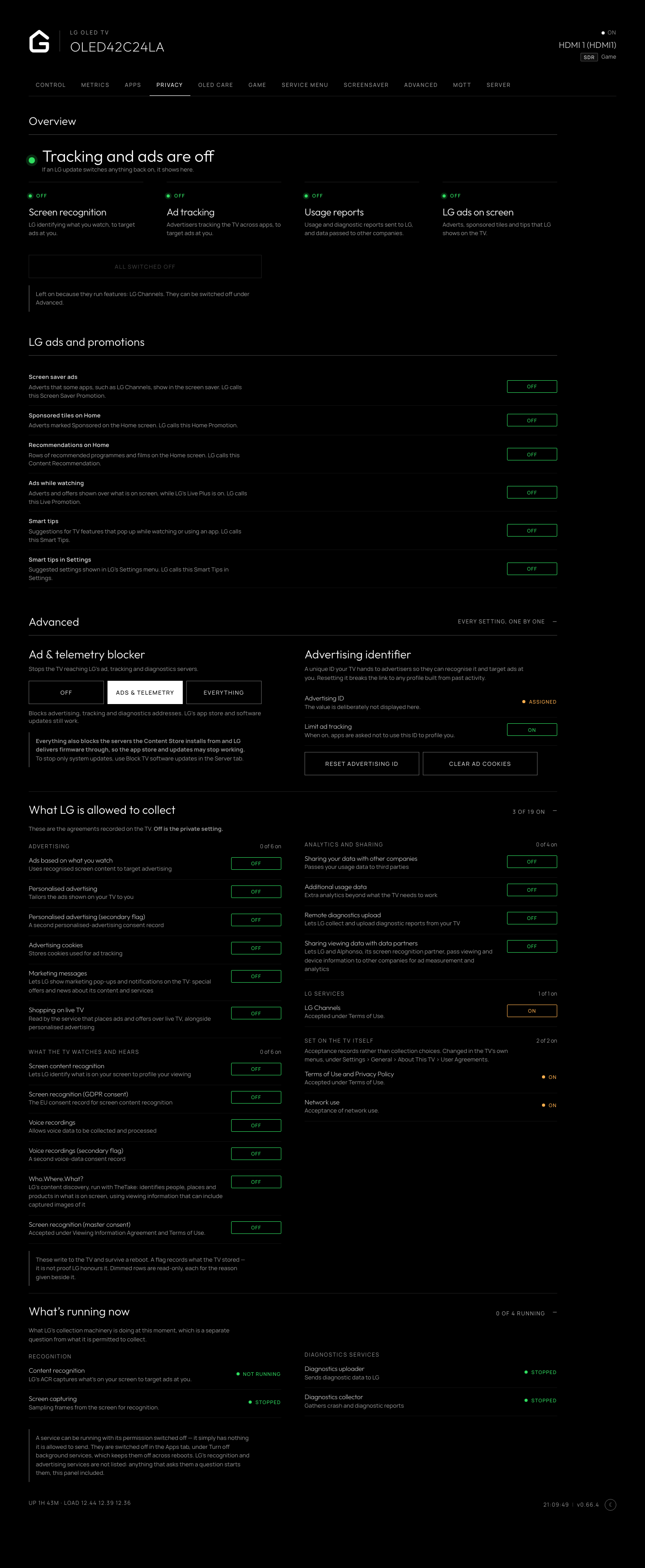
Privacy controls, data agreements, advertising ID and LG telemetry blocking.